
.webp&w=1920&q=75)
If you’re running Facebook Lead Ads and still getting unresponsive, low-intent, or fake leads, the problem is rarely your creativity. The real issue is weak conversion signals. Meta optimizes based on the data it receives—and if it only sees “form submitted,” it will keep finding people who submit forms, not people who actually convert. That’s exactly where Meta Conversions API (CAPI) Integration becomes a lead-quality upgrade, especially when paired with Ledsak AI to capture, sync, and qualify leads more intelligently.
What is Meta Conversions API and why does it matter for lead quality?
Meta Conversions API is a server-to-server tracking system that sends conversion events directly from your backend (website/CRM/server) to Meta—without relying only on browser cookies or Pixel tracking. Unlike the Pixel, which can break due to iOS restrictions, ad blockers, or browser privacy limits, CAPI gives Meta more accurate and consistent data, helping it optimize for leads who actually show buying intent.
Key outcomes of Meta Conversions API:
More accurate tracking than Pixel-only setups
Better attribution despite cookie loss
Stronger optimization signals for higher-quality leads
More control over which lead events matter (Lead vs Qualified Lead)
Why do Facebook leads often look cheap but perform poorly?
Facebook can generate leads at a low CPL, but that doesn’t guarantee business outcomes. This happens because Meta’s optimization engine tends to reward the easiest actions—like fast form submissions—unless you train it with deeper quality data.
Common reasons lead quality drops:
Leads submit forms impulsively
Wrong audience attracted by broad optimization
Bot/fake submissions or low-intent users
Pixel under-reporting conversions due to tracking limitations
No feedback loop after form submission
The real issue: Meta doesn’t know which leads became customers.
How does Meta Conversions API improve Facebook lead quality?
Meta Conversions API improves lead quality by sending stronger signals that teach Meta what a “good lead” actually looks like. When you feed the system more reliable and meaningful events (like qualified leads, meetings booked, purchases), Meta’s algorithm starts filtering out low-intent behavior over time.
What gets improved directly:
Signal accuracy (less loss from browser tracking issues)
Audience learning (Meta finds people similar to your best leads)
Optimization depth (beyond just “submit form”)
Retargeting precision (better segmentation and follow-ups)
What is the difference between Meta Pixel and Conversions API for lead campaigns?
Pixel works through the browser, while Conversions API works through the server. They can be used together for best performance, but CAPI is the backbone for consistent tracking
|
Feature |
Meta Pixel |
Meta Conversions API |
|
Tracking method |
Browser-based |
Server-side |
|
Works without cookies |
Limited |
Strong |
|
Reliable on iOS |
Weak to medium |
Better |
|
Ad-blocker impact |
High |
Low |
|
Best for lead quality optimization |
Not sufficient alone |
High impact |
|
Ideal setup |
Pixel + CAPI |
CAPI + CRM feedback loop |
How does Ledsak AI help make Conversions API Integration more effective?
CAPI alone improves tracking. But when combined with Ledsak AI, you get the missing piece: lead operationalization. Ledsak AI ensures leads don’t just arrive—they get routed, tracked, tagged, and nurtured in a structured way.
How Ledsak AI strengthens Facebook lead quality outcomes:
Captures leads directly from Facebook in real-time
Keeps lead data organized and deduplicated
Enables fast response workflows (speed-to-lead advantage)
Supports qualification tagging (warm/cold, valid/invalid)
Makes your funnel measurable end-to-end
Result: Meta learns from better outcomes, and your team closes better leads.
How do you set up Facebook Integration inside Ledsak AI? (Step-by-step)
Below is a simplified, clean checklist you can follow to activate the Facebook API Integration workflow inside Ledsak AI (aligned with your Facebook integration documentation flow).
Step 1: Open Facebook Integration inside Ledsak AI
Go to your Ledsak AI Dashboard
Navigate to: Integrations → Facebook
Click Connect Facebook
_converted.jpg)
Step 2: Login and authorize your Facebook Business
Sign in using your Facebook account
Allow permissions for:
Facebook Pages
Leads access
Ad Account (if required)
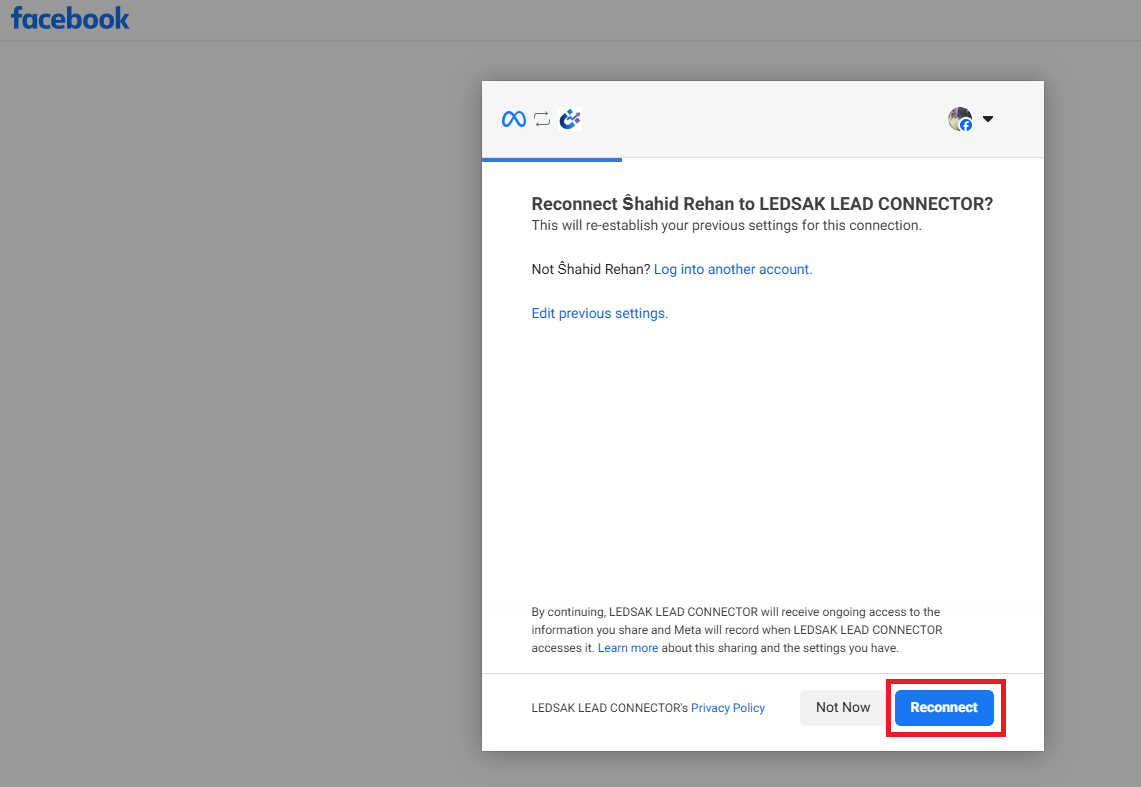
Step 3: Select your Facebook Page
Choose the Page connected to your Lead Ads
Confirm the Page is active and correct
.png)
Step 4: Connect the Lead Form(s)
Choose which forms should sync into Ledsak AI
Confirm mapping to the right pipeline/source
.png)
Step 5: Enable lead syncing + automation
Once your Page + Form is connected, enable automation so that leads flow immediately into your system.
Recommended automations:
Auto-assign to team member
Auto-tag by campaign/form
Auto-trigger WhatsApp / email follow-up
Auto-create deal/opportunity
.png)
What are the best event signals to send for better lead quality?
If Meta only receives “Lead Submitted,” it will optimize for cheap leads. If you send deeper signals, Meta optimizes for better leads.
High-impact event structure:
Lead → user submits form
Qualified Lead → verified + fits criteria
Appointment Booked → meeting scheduled
Purchase / Closed-Won → customer conversion
Quality signals you should track:
Lead contacted successfully
Lead responded
Lead is valid number/email
Lead is decision maker
Lead requested callback/demo
How long does it take to see improved lead quality after Conversions API Integration?
In most cases, improvements happen in phases—not instantly.
Typical optimization timeline:
Week 1: Tracking stabilizes, better attribution starts
Week 2–3: Algorithm begins learning quality patterns
Week 4+: Noticeable shift in lead intent and responsiveness
What speeds it up:
Higher daily lead volume (more learning data)
Sending Qualified Lead events
Faster follow-up using Ledsak AI automation
What mistakes reduce lead quality even after setting up CAPI?
Many teams integrate CAPI but still get weak results because they don’t close the loop with meaningful events.
Avoid these common mistakes:
Only sending “Lead” event (no qualification events)
No CRM stages or lead scoring feedback
Slow response time after lead capture
Wrong form mapping (mixing cold vs warm intents)
Not filtering fake/invalid leads in reporting
What is the ideal lead quality strategy using Facebook + Ledsak AI + CAPI?
Here’s the system approach that works best:
✅ Facebook collects leads
✅ Ledsak AI captures + organizes leads instantly
✅ Your team qualifies leads (MQL/SQL)
✅ Conversions API sends quality events back to Meta
✅ Meta finds more people like your best leads
This creates a loop where Meta gradually stops optimizing for volume and starts optimizing for value.
Final Takeaway
Meta doesn’t optimize for “good leads” automatically—it optimizes for whatever you measure. With Meta Conversions API Integration, you give Meta stronger conversion signals. With Ledsak AI, you operationalize those leads instantly and qualify them properly. Together, you move from cheap leads to high-intent leads that convert—not just fill forms.